Issue 0830 October 20266 min

Context comesfirst.

A weekly design briefing on the tools, visual work and team methods changing how product teams decide and build.

Read this week’s argument

PRODUCT DESIGN · FIGMA + MCP · AI PROTOTYPING · SYSTEMS · CRAFT

The product context is becoming part of the design tool.

Cover story · Figma, GitHub and practitioner work · 26–30 Oct

The interesting shift this week is not that more tools can generate a screen. It is that they can now reach further into the work around it.

Figma’s agent can pull Drive research, assets and real data into a file. GitHub’s new Replica asks teams to give prototypes their own components and written rules. In a UX Collective essay, designer Christine Vallaure describes doing the reverse journey: keeping the system in code, then using an agent and MCP to build its Figma library.

That makes context the new design material: useful only when its source, permission, freshness and gaps stay visible. A plausible prototype can still be wrong if it quietly borrows stale research, invents a policy or exposes private data.

For Phoenix: give every agent-assisted exploration a small context envelope: approved components, a safe data sample, the user task, known unknowns and the person who makes the decision.

“If you want something great you should make the design system yourself.”

The new releases are about richer context—and clearer control.

Five changes worth knowing, with their access limits and a practical Phoenix angle.

01

Figma can bring Drive research onto the canvas.

Figma agent · 30 Oct · all plans

Connect Google Drive to Figma’s agent and Make to summarize research, refer to real data, pull in assets or create a Drive file without leaving the design file. The connector is available on all plans, including Starter.

Phoenix angle: test with a sanitized research note and synthetic account data. Keep the original source and date beside the insight; connected context is not automatically current context.

Read the 30 Oct release note
02

Teams can publish their own Weave tools inside Figma.

Figma Weave · 30 Oct · Organization and Enterprise

Internal tools now appear in Figma’s Tools tab alongside Figma and Community tools. That creates a route for a team to share repeatable creative workflows in the place designers already work; publishing is limited to Organization and Enterprise plans.

Phoenix angle: consider a bounded tool for producing approved, synthetic scenario imagery, with a clear owner and review step.

Read Figma’s internal publishing note
03

Generative plugins now keep versions you can restore.

Figma Design · 27 Oct · rolling out

Editing a generative plugin or shader creates a new version, with an agent-written description of the change and a way back to earlier versions. Version history makes small, reviewable experiments safer than overwriting the current tool.

Phoenix angle: try a versioned change on one internal prototype helper; compare output before publishing to the team.

See the 27 Oct release note
04

Weave’s image and video models can run through Figma MCP.

Figma MCP · 26 Oct · paid Weave account

External agents can call video and image models available in Figma Weave. This needs a connected paid standalone Weave account; it uses Weave credits, and the agent must show the price and ask before a paid run.

Phoenix angle: keep this to concept visuals and synthetic assets. Confirm the cost and data boundary before sending a prompt.

Check Figma’s MCP and Weave terms
05

GPT-6.1 Terra brings visual reasoning to Work and Codex.

OpenAI · 26 Oct · plan and region dependent

OpenAI says Terra combines visual reasoning, computer use and writing. Its benchmark comparisons are vendor-reported; they are not evidence that it will critique Phoenix interfaces reliably.

Phoenix angle: run one synthetic screen through a fixed review rubric, then compare the notes with a designer’s. Keep the human judgment and the test criteria in view.

Read OpenAI’s model announcement

Three things worth seeing.

Each example shows a different way to keep product language, source material and review attached to generated work.

CODE → FIGMA → GAP REVIEW

A pattern from one practitioner workflow, not a universal standard

Ship the gap list beside the generated library.

Christine Vallaure’s article describes a simple control loop: ask the agent to write down what it could not express or was unsure about, review those gaps yourself, then compare component names, properties and defaults with a deterministic check.

Why it works: a polished canvas can hide invented behaviour. A visible gap file makes uncertainty reviewable, while the parity check tests the output against information the model did not generate.

Phoenix try: use one bounded component set and ask for a `GAPS.md` before anyone approves the generated Figma library. Treat the article as one practitioner’s method, not proof that code should always replace Figma as source of truth.

Read the method and its limitations

Inside a team: Reddit built a bridge, not a blank prompt.

Blair Metcalf, Reddit’s principal UX engineer, describes an internal prototype harness around Figma, MCP, Cursor, a production-shaped component map and a “feature capsule” that carries requirements into engineering review. In the interview, he reports 100% adoption across the UX and product organization and more than 700 live prototypes. Treat those figures as company-reported, not independent evidence.

  1. 01Map approved Figma components to their real code counterparts.
  2. 02Keep the user task and constraints attached to the prototype.
  3. 03Turn comments into targeted edits; let engineers review the handoff.

Phoenix translation: start with one synthetic flow and track whether an engineer can tell what is reusable, what changed and what still needs product judgment.

Listen to Blair Metcalf explain Reddit Proto

Replica is worth a local, synthetic-data trial.

Released by GitHub Design on 28 October. The prototype is public; the team’s context and data policy still need your own review.

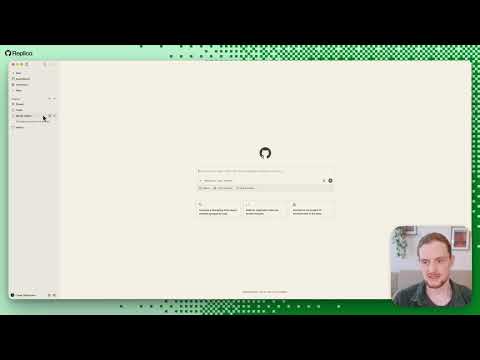
Replica is an open-source workspace that pairs a prototype canvas with a GitHub Copilot conversation. Teams describe approved components and product rules; the agent uses that guidance as it builds. The optional Hub adds shared publishing and review comments.

Job
Explore a product flow using the team’s own components and documentation.
Setup
Moderate locally: GitHub Copilot app and sign-in, Git, Node.js and npm. A shared Hub takes substantially more work: Linux hosting, domain, wildcard DNS, HTTPS and GitHub permissions.
Maturity
New public project, 72 commits and 13 open issues at review time; GitHub staff maintain it. No tagged release history yet, so stability and issue health are still unproven.
Licence
MIT; bundled fonts are SIL Open Font License.
Privacy
Hub retains publishing and review activity for 90 days. GitHub and the chosen model provider have their own data terms; self-hosting does not mean no data leaves your organisation.

Phoenix verdict: try a fictional assistance flow with public assets and synthetic data. Do not connect a live Phoenix repository, design library or traveller information during the first evaluation.

Figma’s MCP skills now include safer Code Connect guidance.

The official `figma/mcp-server-guide` repository moved from skill bundle 2.2.163 to 2.2.174. The update improves error handling for published components and warns agents not to retry unchanged mappings after specific failures.

Why designers and engineers should care: fewer duplicate or impossible mappings means less cleanup between a Figma library and implementation.

Try: update one test environment, then map a published component and inspect the failure path for an unpublished one. The guidance says to fix the cause first, then verify a sample mapping.

Repository check: Figma-maintained, documented and actively updated on 28 Oct; 12 open issues at review time. It has no repository licence declared, so use the distributed plugin/skills rather than assuming the files are reusable under an open-source licence. No service credentials are needed to read it; using MCP still requires normal Figma access.

A community signal · r/DesignSystems · 26 Oct

One current thread pushed back on generic agent-made systems: useful output still depends on a team’s own patterns and taste. That is an opinion, not adoption evidence—but it is a useful counterweight to polished tool demos.

Read the public discussion
10-minute critique

A prototype is only as trustworthy as the context it borrows.

Research, component libraries and account data can make a prototype feel more real. They can also be stale, out of scope or sensitive. Faster context access raises the bar for showing where a claim came from and what the agent invented.

Ask: can a reviewer distinguish approved product evidence from generated filler?

Choose one prototype. Spend ten minutes marking each content claim as sourced, synthetic or unknown. Decide what must be checked before anyone treats it as a product direction.

Try this Friday: find the stale promise.

International SOS provider search · use /phoenix-content + /phoenix-handoff.

A traveller abroad searches for a nearby clinic. The directory has opening hours, a local time zone and a “last checked” timestamp—but the network may be down and the data may be old. Design the result so it never implies live availability when the product cannot confirm it.

  1. 01 · 8 minRun a data-freshness walkthrough. Mark every fact as current, cached, stale or unknown; identify what the service can verify.
  2. 02 · 12 minUse /phoenix-content to write the result labels and next action for each state. Keep clinic hours in local time and never turn “last checked” into “open now.”
  3. 03 · 10 minUse /phoenix-handoff with an engineer to define freshness rules, offline behaviour, time-zone handling and acceptance criteria for stale data.
  4. 04 · 10 minAsk a designer who did not make the flow to scan it. Can they tell what is known, when it was checked and what to do next?

It passes when a traveller can choose a safe next step without mistaking an old directory record for a confirmed appointment.

Open the Phoenix Designer Skills field guide

Whether tools can show the source, freshness and permission boundary of context they bring into a design.

Generic “agent-ready” claims with no system example, review method or data policy.